Read Our Reviews on:


Are you drowning in monthly accounting chores instead of focusing on growth?
Even a small finance team can spend days every month reconciling bank statements, routing vendor bills, or processing expense claims. These repetitive, error-prone tasks are exactly where automation pays off.
Modern cloud tools (like Xero, QuickBooks Online, Dext, Bill.com, Expensify, Ramp, etc.) let you connect bank feeds, OCR-scan invoices, and route approvals automatically. The result? Hands-off workflows that free your team to focus on strategy, while closing the books faster and more accurately.
Below we dive into five high-impact tasks every SME should automate today, with real examples of time saved and tools that deliver fast ROI.
1. Bank Reconciliation
Manual bank reconciliation is a headache: downloading statements, matching each line to your ledger, and chasing missing receipts. Every mismatch is a scramble for answers. By contrast, automation makes reconciliation nearly instantaneous.
In practice, you’d connect your bank(s) to Xero or QuickBooks for live feeds, and set up simple auto-coding rules for common transactions (e.g., rent, utilities, regular suppliers). An OCR tool like Dext (formerly Receipt Bank) or AutoEntry can fetch emailed or scanned receipts and convert them into coded transactions.
These feed straight into your accounting system, where the software auto-matches them against bank lines. Instead of hours of clicking, you get a one-click “reconcile” or clear-suggestion for most transactions.
- Connect bank feeds: Link your bank accounts (BDO, BPI, etc.) to Xero or QuickBooks so transactions flow in automatically. (Xero PH even supports e-invoicing and BIR-compliance features.)
- Set rules for recurring items: Configure auto-categorization rules (e.g., payroll, rent, utilities) so the system tags identical transactions automatically.
- Use receipt capture: Tools like Dext/AutoEntry or Xero’s Hubdoc app can import PDF bank statements and supplier invoices, extract the data via OCR, and publish coded entries in seconds.

Result: What took hours can now happen in minutes. For example, businesses that automate their accounting sync report up to 90% faster reconciliation and close processes, virtually eliminating duplicate entries and slashing posting errors.
Xero’s AI assistant (JAX) even handles bank rec on autopilot, “saving you time [and] reducing errors”. In practice, a finance lead could spend 1–2 hours a month reviewing reconciliations instead of a full day. The clear benefits are better efficiency, fewer mistakes, and more time to analyze cash flow.
2. Accounts Payable (Vendor Invoicing)
Paying suppliers used to mean printing or forwarding paper bills, emailing approval chains, and mailing checks – a slow, frustrating process. Automated AP fixes this end-to-end. For instance, using a platform like Bill.com or Ramp’s AP module, invoices are emailed or uploaded into the system, approvals happen in one click, and payments (ACH/check/virtual card) are issued automatically.
With Xero/QuickBooks plus a scanning tool, vendor invoices are OCR-scanned (by Dext/Hubdoc), auto-matched to suppliers, and queued for approval. No manual entry and no lost invoices.
Here’s a step-by-step way it works:
- Capture invoices: Have vendors email invoices directly to your system (Bill.com inbox or Dext). The software extracts dates, amounts, and line items automatically.
- Approval workflows: Set up custom approval rules (e.g., any bill over PHP 10k needs manager sign-off). Managers get email or mobile alerts to approve or reject with one tap.
- Automated payment: Once approved, pay from the same system. Bill.com, for example, can issue ACH or checks (even internationally) from one dashboard. Ramp lets you pay with corporate cards or ACH, syncing back to Xero or QuickBooks. Both sync the payment back to your accounting file.
Tools & ROI: In practice, we often pair Xero with Bill.com (Xero for books, Bill.com for invoice workflow) or QuickBooks Online with Dext (for capture) or QuickBooks with Ramp. These combos deliver quick ROI by cutting steps. One accounting firm reported that processing each bill went from 3.67 minutes to 2.33 minutes with Bill.com (a 30% time reduction) – saving nearly 9.6 workweeks of effort per year.
In short, AP automation means no more digging for invoices or missing late payments. You’ll pay on time, improve vendor relationships, and catch duplicate/fraudulent invoices before they slip through.
3. Expense Report Approval and Reimbursement
Handling employee expenses is another classic time-suck: collecting paper receipts, manually categorizing, and writing reimbursements. Expense management apps like Expensify or Ramp turn this into an instant process.
Employees snap receipts with their phone or use a company card that auto-syncs, and the software uses OCR/AI to match transactions to receipts and categories. Then automated workflows route expenses to managers for one-click approval, and reimbursements can hit the employee’s account immediately or be paid with a corporate card.
For example, Expensify + QuickBooks is a popular combo: Expensify’s SmartScan automatically captures receipts and categorizes them, syncing to QuickBooks with no retyping. Approvals happen by email or mobile app. Or Xero + Ramp works similarly if you’re using corporate cards.
Ramp’s cards integrate with Xero so every card transaction posts to your books in real time, and in-app approvals enforce spend policies. The time savings are huge:
- Instant capture: Receipts are snapped or emailed, and Expensify’s AI reads the vendor, date, and amount automatically.
- Auto-categorization: Pre-set categories (travel, meals, supplies) apply rules so reporting is accurate without data entry.
- Streamlined approval: Managers get notifications and approve with a click. The system then auto-syncs the approved expenses to your accounting software.
Real benefits: No more shoeboxes of receipts. One retailer (Seasonal Magic) with dozens of stores found that after moving to Expensify, their team achieved “zero manual receipt scanning or data entry” and even uncovered $23,000 in hidden savings through better spend reporting.
Likewise, a recent Forrester study of Ramp customers found that corporate spend automation gave back 1,200 hours of finance-team work and 5,400 hours of employee time over three years.
In practice, these tools make expense reporting practically effortless, improving visibility into spending patterns (so you can rein in overspend) while letting staff spend more time on value-adding work.
4. Month-End Close Tasks
The dreaded “month-end close” often means juggling endless tasks: finalizing entries, reconciling accounts, generating reports, and fixing any discrepancies. Traditionally, this involved manual reconciliation of every account, manual journal entries (e.g. payroll accruals, depreciation), and consolidating data from multiple spreadsheets.
It often took days or weeks, delaying insights and stressing teams. Much of the month-end close comes automatically once upstream workflows are automated. If your bank rec, AP, and expense processes are already streamlined, your trial balance will already be in good shape.
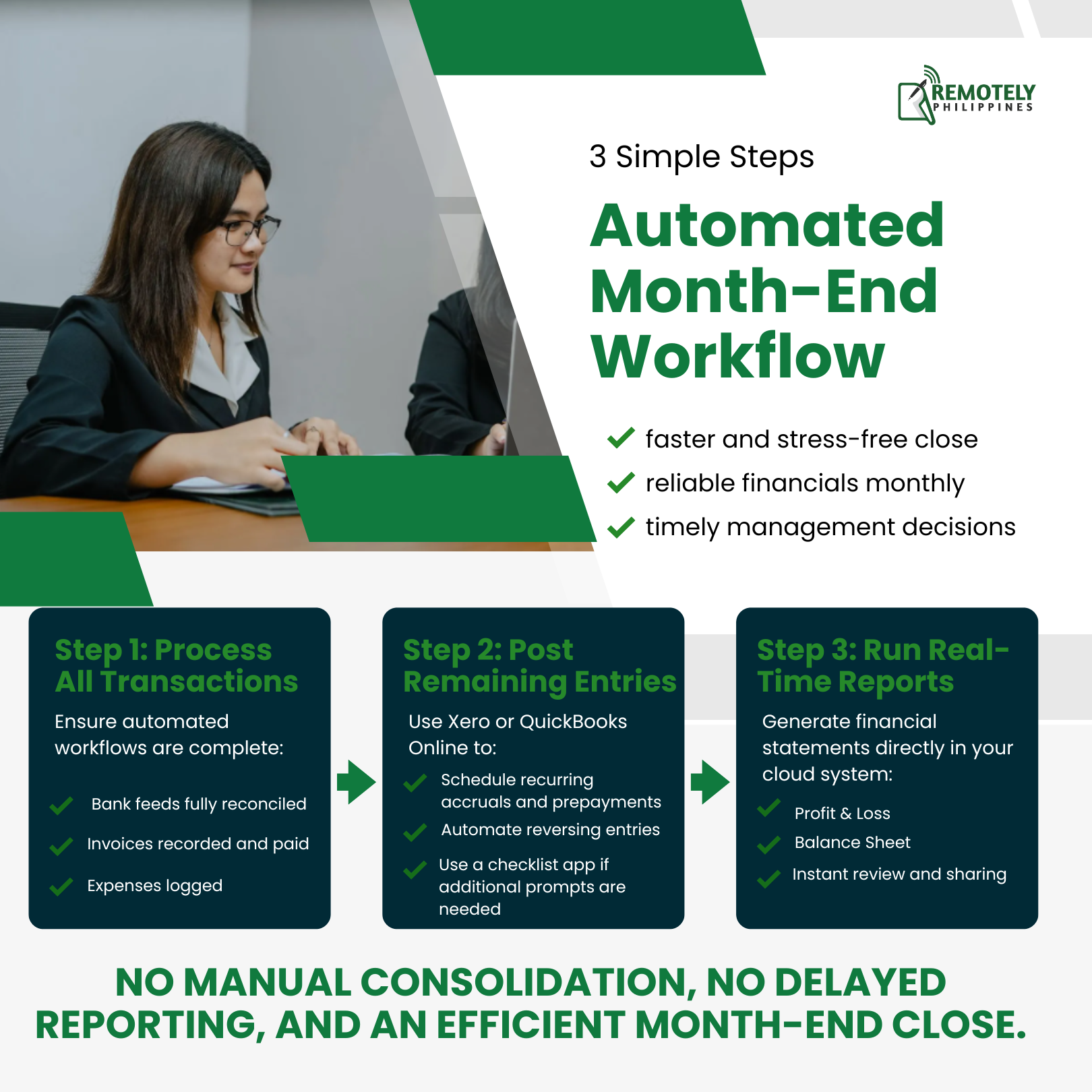
On top of that, accounting systems like Xero and QuickBooks have features to automate recurring journals and closing steps. For example, you can set up automatic reversing entries for prepaid expenses, amortizations, or accruals.
Cloud tools provide instant reporting: pre-built P&L and balance sheet reports are just a click away. Some teams also use close-checklist software (e.g., workflows in practice management tools) to track completion of each close step.
- Step 1: Ensure all incoming transactions are processed by your automated workflows (bank feeds all reconciled, invoices paid, expenses logged).
- Step 2: Use Xero/QuickBooks to post any remaining accruals or prepayments via scheduled recurring entries. If needed, a lightweight app can prompt you with a checklist.
- Step 3: Run the financial reports in the cloud system (they update in real time). Review and share – no more waiting for manual report generation.
Most SMEs can do this with Xero’s built-in features or QuickBooks Online’s reporting. If you want extra assurance, add an integration like G-Accon or Fathom for advanced analysis. But often, the automation from tasks (1–3 above) alone delivers the biggest gains.
Research shows syncing workflows accelerates closings significantly. For instance, automating QuickBooks with real-time integrations saved teams 90% of reconciliation and month-end time. An e-commerce firm went from a one-week close to same-day reporting by automating sales and bank feeds. In SMEs, this means what used to take days can often be done in a few hours.
Benefits: The clear pay-off is a faster, stress-free close. You get reliable financials sooner each month, enabling timely management decisions. With continuous automated processes, “close crisis” disappears – everything is already done as you go.
5. Fixed Asset Tracking and Depreciation
Many businesses struggle with fixed asset management: tracking assets, calculating depreciation, and recording disposals. Manually maintaining an asset register and computing monthly depreciation in Excel is tedious and error-prone. Missing a depreciation entry or applying the wrong rate can throw off your P&L and BIR compliance.
Use the accounting software’s asset register and automation. For example, Xero’s Fixed Asset Module lets you enter asset details once (purchase date, cost, useful life, salvage value, depreciation method) and then automatically handles all depreciation journal entries.
The system recalculates remaining life each month. When an asset is sold or disposed of, you mark it in Xero, and it automatically books any gain/loss. All asset balances and depreciation schedules are available on one dashboard.

QuickBooks also supports fixed assets via add-ons or its Enterprise edition, and tools like AutoEntry/Dext can scan and import asset purchase invoices.
- Step 1: When you buy equipment or property, capture the invoice with Dext or AutoEntry and publish it to your accounting file as a fixed asset.
- Step 2: In Xero (or QBO), go to the Fixed Asset register and “create asset” with cost and depreciation info. The system will calculate depreciation going forward.
- Step 3: Each month (or each fiscal year), run the depreciation process. Xero posts the depreciation expense automatically on schedule. Check the asset register report to review values.
A strong combo is Xero + Hubdoc/AutoEntry. Hubdoc scans your asset invoices and pushes them into Xero; then Xero’s asset manager tracks depreciation. Similarly, QuickBooks + Dext can be used if you subscribe to a plan that includes asset management.
While ROI here is more about accuracy than hours saved, it still cuts admin time. Xero customers note that “tracking assets from one dashboard” and automatic depreciation radically simplify compliance.
For example, what might have required a day of spreadsheet work can become a few clicks. Fewer errors mean no penalties from the BIR (straight-line depreciation and salvage values are handled correctly automatically).
Benefits: Automated asset tracking ensures no asset is forgotten or mis-depreciated. You maintain accurate net book values and depreciation expenses with minimal effort. This keeps your financial reports reliable and ensures Philippine tax rules (e.g., SALN audits, income tax) are followed seamlessly.
Final Thoughts: Automation Is Not About Replacing People - It’s About Releasing Capacity
Automation is not about removing your finance team from the equation. It is about removing friction. When repetitive, rule-based tasks are handled by connected systems, your team gains back its most valuable resource - attention.
Attention to cash flow trends. Attention to margin analysis. Attention to compliance risks before they become problems. The businesses that benefit most from automation are not necessarily the largest.
They are the ones disciplined enough to standardize processes first, connect tools second, and review results consistently. Even incremental automation - starting with bank feeds, AP workflows, or expense capture - can dramatically reduce close times and operational stress.
The goal is not just speed. It is predictability. It is control. It is fewer surprises at the month-end. If your accounting function still feels reactive - constantly catching up instead of driving decisions - it may be time to redesign the workflow.
At Remotely Philippines, we help SMEs implement practical automation layered with disciplined processes and dedicated accounting support. The tools already exist. The opportunity is in execution. The question is not whether automation works. It’s where you’ll start.
Sign up for our newsletter
Get regular curated content on management, outsourcing, and everything you need to know to stay ahead of the curve.
Newsletter
More Articles